

IBM Architecture Room Live - Overview
A web-based real-time, multi-user, collaborative modeling environment for globally geographically distributed teams.
Our Price: Request a Quote
Click here to jump to more pricing!
Please Note: All Prices are Inclusive of GST
Overview:
What it can do for your business
Accelerate the design and delivery of solutions that your business stakeholders require. Simple design sessions on a shared whiteboard and the ability to collaborate globally in real-time makes IBM Architecture Room Live a powerful offering for your business.
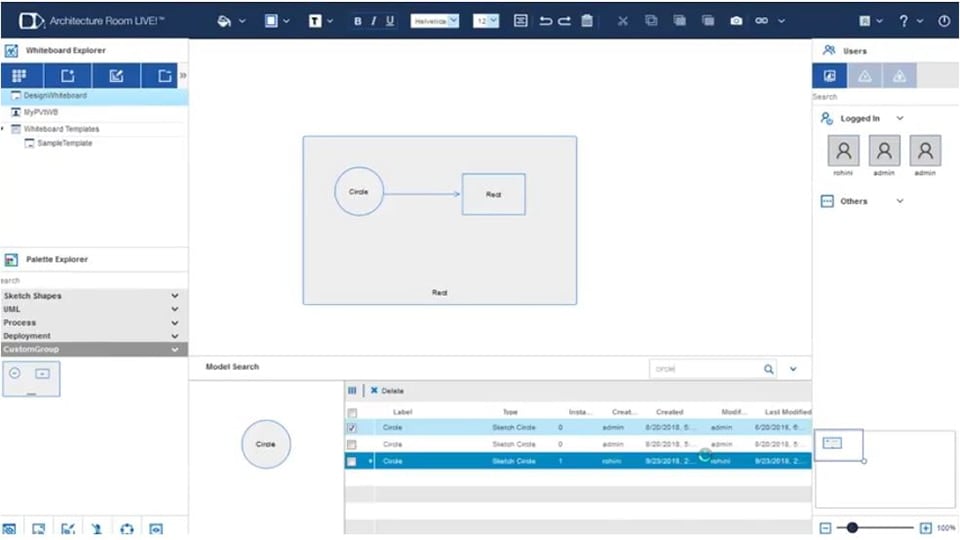
Architecture Room Live is as simple as a whiteboard, but it’s more than just drawing: All your designs are based on a modeling backbone assuring consistency and integrity for all your architectural domains. Stakeholders are only a URL away from validating and verifying the completeness of a solution delivered to your customers.
Real-Time and Multi-user Collaboration
Work with your team in real time, no matter where they are located ensuring everyone is onboard.
Whiteboards
Easily organize your designs on different whiteboards linking them as your designs expand.
Architectural Designs
Create consistent architectures without the complexity of formal modeling while maintaining strong design integrations.
Features:
User friendly web interface
Easily accessible via a web browser, requiring no user installation. The intuitive interface provides easy organization and development of your designs.
Real-time collaboration
Collaborate with geographically distributed teams in a virtual design room environment on designs in real time. Share and review design input in real-time to rapidly converge on a final design.
Simplified modeling
The simplified modeling environment allows designers to mix class and sequence diagrams on the same canvas while still utilizing a true modeling backbone.
Whiteboards
A standard canvas to draw your designs and organize your whiteboards in a hierarchy. Users can control which whiteboards should be public and which should remain private.
Whiteboard templates
Easily accessible via a web browser, requiring no user installation. The intuitive interface provides easy organization and development of your designs.
Custom shapes and palette groups
Create custom shapes to capture your domain specific elements and organize them into relevant palette groups so that teams can create reusable shapes and maintain consistency across an organization’s designs.
Presentation mode
Invite team members to a presentation that will allow them to follow the navigation as you showcase your designs and ideas across multiple whiteboards to a worldwide team. Stakeholders and the presenter can collaborate, share quick feedback and change the design collaboratively, in real time.
Integration with Design Room ONE
Create Architecture Room Live elements by quickly importing Design Room ONE elements to leverage real-time collaboration capabilities for further design evolution.
Benefits:
Specifications:
Pricing Notes:
- All Prices are Inclusive of GST
- Pricing and product availability subject to change without notice.
Our Price: Request a Quote